Read-only server monitoring for AI assistants
Monitor your Linux servers with AI.
Just ask. Your servers will answer.
Connect your Linux servers to Claude, ChatGPT or Cursor. Ask about CPU, memory, disk, network and Docker in plain English, and get answers from real measurements.
- One-line install
- AI can't run commands
- No card needed
How is web-demo doing right now?
- get_server_status
- get_memory_usage
- read-only
web-demo is online and healthy: memory 709 MB of 2.06 GB used. Nothing needs attention.
- CPU
- 5.8%
- Memory
- 34.4%
- Disk
- 15.3%
Works withClaudeChatGPTCursorVS CodeAny MCP client
Connect the assistant you already use
One-click sign-in for Claude and ChatGPT. An API key for developer tools.
Claude
Listed in the Claude connector directory: open it, click Connect and sign in.
Open in Claude directory →ChatGPT
Connect it as a remote MCP server and sign in.
One-click sign-in
Cursor & dev tools
Paste a revocable API key into any MCP client.
API key
It can look.
It can’t touch.
A lightweight agent sends metrics out over HTTPS. Your assistant reads them through read-only tools. That’s the whole surface.
Read the security overview →- No shell access, no executed commands
- No stored SSH keys; the agent only connects out over HTTPS
- Organization isolation with database row-level security
- Owner, admin, developer and viewer roles
- Revocable API keys, connected apps and an audit log
See it in 4 min
From sign-up to your first answer: add a server, install the agent, connect Claude or ChatGPT, and ask.
A short video for every feature
12 narrated tutorials, one per module: security, uptime, cron jobs, incidents, alerts, logs, deployments, SSL and the AI assistant.
 1:19
1. Getting started
Add a server, install the agent and see live data in about a minute.
 1:00
2. Servers and Docker
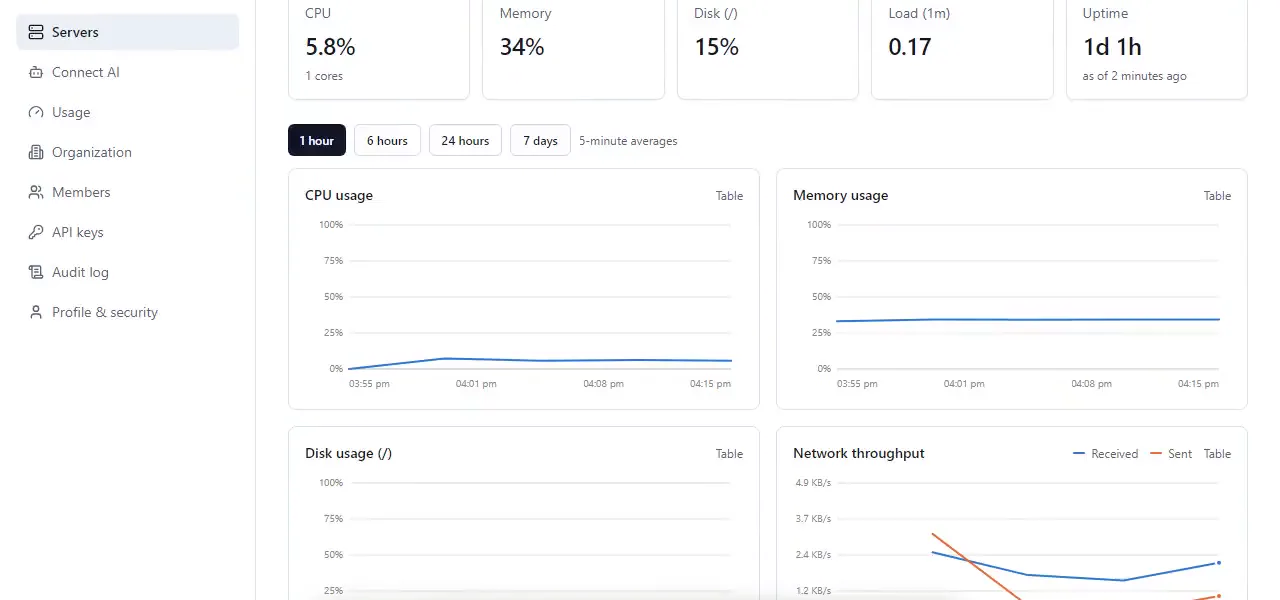
Live charts, history and container health for every server.
 0:55
3. Health score
One number for your whole infrastructure, and what to fix first.
 1:38
4. Security
A security score, ranked findings and the exact fix for each one.
 1:03
5. Uptime monitoring
Website and API checks every minute, with response times and uptime history.
 0:55
6. Cron jobs and backups
Know when a scheduled job or backup does not run, or reports a failure.
 1:20
7. Incidents
Every outage in one place, with AI investigation and maintenance windows.
 1:04
8. Alerts and notifications
CPU, memory, disk and offline alerts, sent to email, Slack and Microsoft Teams.
 1:03
9. Logs and AI log analysis
Repeated errors grouped, secrets removed, and AI that explains what is going on.
 0:50
10. Deployments
GitHub Actions and GitLab CI runs, and what each deploy did to your servers.
 0:52
11. SSL certificates and domains
Never let a certificate or a domain expire again.
 1:13
12. Ask AI and Connect AI
Ask about your servers in plain English, here or in Claude, ChatGPT and Cursor.
What happens after you install the agent
From one command to your first answer in about five minutes.
- 01
Server appears online
Within a minute it shows in your dashboard with its OS, CPU cores and current CPU, memory and disk.
- 02
Regular readings
New readings every 30 seconds to 5 minutes depending on your plan, kept for 7, 30 or 90 days.
- 03
Alerts if you want them
Set CPU, memory, disk or offline thresholds and get email, Slack or Teams notifications (Pro and Business).
- 04
Ask your assistant
Connect Claude or ChatGPT once, then ask in plain English. Answers come from these readings.
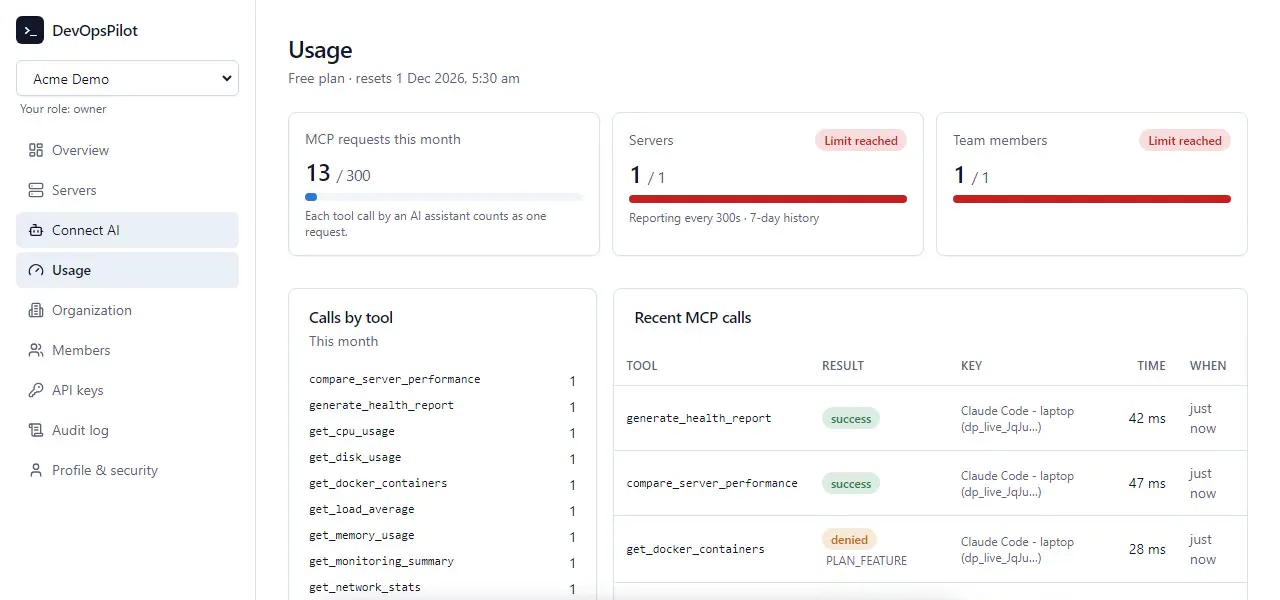
And a dashboard, too
Screenshots from a demo account monitoring a real Ubuntu server.
Answers to the three questions that matter
More than CPU, RAM and disk charts.
Is my infrastructure healthy?
One health score across servers, websites, cron jobs, certificates and deployments, with the few things worth fixing first.
Did my deployment cause a problem?
Every GitHub Actions or GitLab run is lined up with your server metrics, so a CPU or memory jump after a deploy is flagged.
What should I investigate next?
When something breaks, the AI investigation pulls the related metrics, deploys and errors into one report with likely causes.
All plans
SSL certificate expiry
Days left for each domain, checked every 6 hours; expiry alerts on Pro and Business.
All plans
Website and API uptime
HTTP checks every 1 to 5 minutes, status and keyword assertions, response times and uptime %.
All plans
Cron jobs and backups
A ping URL per job. Know the moment a backup fails or a cron job does not run.
All plans
Incidents and health score
One incident per outage, acknowledge and resolve, maintenance windows, and a 0-100 health score.
Pro · Business
AI assistant in the dashboard
Ask about your servers, sites, jobs and deploys right in AskMyServers. Read-only, like everything else.
Pro · Business
AI log analysis
Repeated errors grouped automatically and explained in plain English, with likely causes and fixes.
Business
Deployments
GitHub Actions and GitLab CI runs, success rate and durations, and a flag when CPU or memory jumps after a deploy.
Pro · Business
Daily report
Every morning: servers online, uptime, failed deploys, missed jobs and expiring certificates or domains.
All plans
Security scan
A security score with findings ranked Critical to Low: open databases, SSH password login, missing firewall, exposed .env files. Each with the exact fix.
All plans
Domain expiry
Registration expiry for every monitored domain, with reminders at 30, 15, 7 and 1 days.
Coming soon
Cloud cost and Kubernetes
AWS cost tracking and Kubernetes monitoring are next on the roadmap. Not part of any plan yet.
Start free. Upgrade when you grow.
Billed per organization. Cancel any time.
Free
Free
- 1 server · 7-day history
- 300 AI tool requests a month
- Uptime, cron and SSL monitoring
Pro
$19 / month
billed in USD via PayPal
- 5 servers · 30-day history
- 5,000 AI tool requests a month
- Email, Slack and Microsoft Teams alerts
- Built-in AI assistant · 200 analyses
Business
$79 / month
billed in USD via PayPal
- 25 servers · 90-day history
- 50,000 AI tool requests a month
- Email, Slack and Microsoft Teams alerts
- Built-in AI assistant · 2,000 analyses
Questions
What is AskMyServers?
Server monitoring you can ask questions. A small agent reports CPU, memory, disk, network, load and Docker from your Linux servers, and you ask about them in plain English in Claude, ChatGPT, Cursor or the built-in assistant. Website uptime, cron jobs, SSL, security, logs and deployments are included.
Can the AI change anything on my servers?
No. The agent only sends readings out over HTTPS; it opens no ports and cannot run commands. Every AI tool is read-only, so an assistant can look but never touch.
What do I need to install?
One command installs the agent on Ubuntu, Debian, CentOS, Red Hat or Amazon Linux with systemd. Website uptime, cron job and SSL monitoring need no install at all.
Is there a free plan?
Yes, free forever: 1 server, 2 uptime monitors, 1 cron job, 1 SSL domain, a weekly security scan and 300 AI tool requests a month. No card needed.
Which AI assistants work with it?
Claude (claude.ai, Desktop and mobile) and ChatGPT with a secure sign-in, and Claude Code, Cursor, VS Code or any MCP client with an API key.
How is my data protected?
Each organization is isolated in the database with row-level security. There are owner, admin, developer and viewer roles, revocable API keys and an audit log, and secrets are removed from logs before they are stored.
Can I cancel any time?
Yes. Paid plans are monthly or yearly, and if you cancel your plan stays active until the end of the period you paid for.
Ask your servers anything
Up and running in about two minutes. Free with one server, no card needed.